> For the complete documentation index, see [llms.txt](https://docs.korewireless.com/llms.txt). Markdown versions of documentation pages are available by appending `.md` to page URLs; this page is available as [Markdown](https://docs.korewireless.com/kore/developers/get-started/apis.md).
# APIs
{% hint style="info" %}
This documentation applies to the following products:
* Super SIM
* Programmable Wireless
Ensure you follow the [guide ](https://www.twilio.com/docs/iot/kore-acquisition/link-your-twilio-kore-accounts)to link your Twilio account to KORE before continuing.
For all other products, please review their respective documentation
{% endhint %}
## Introduction
Welcome to KORE's developer experience! Follow these steps to begin your journey with KORE's various developer tools, starting with making your first API call.
{% hint style="info" %}
If you need assistance at any point during registration, contact support.
{% endhint %}
{% hint style="warning" %}
This guide assumes you have already created an account with KORE. If you have not, follow our [getting started guide](/kore/iam/get-started/first-account.md) before continuing.
{% endhint %}
## Access Developer Console
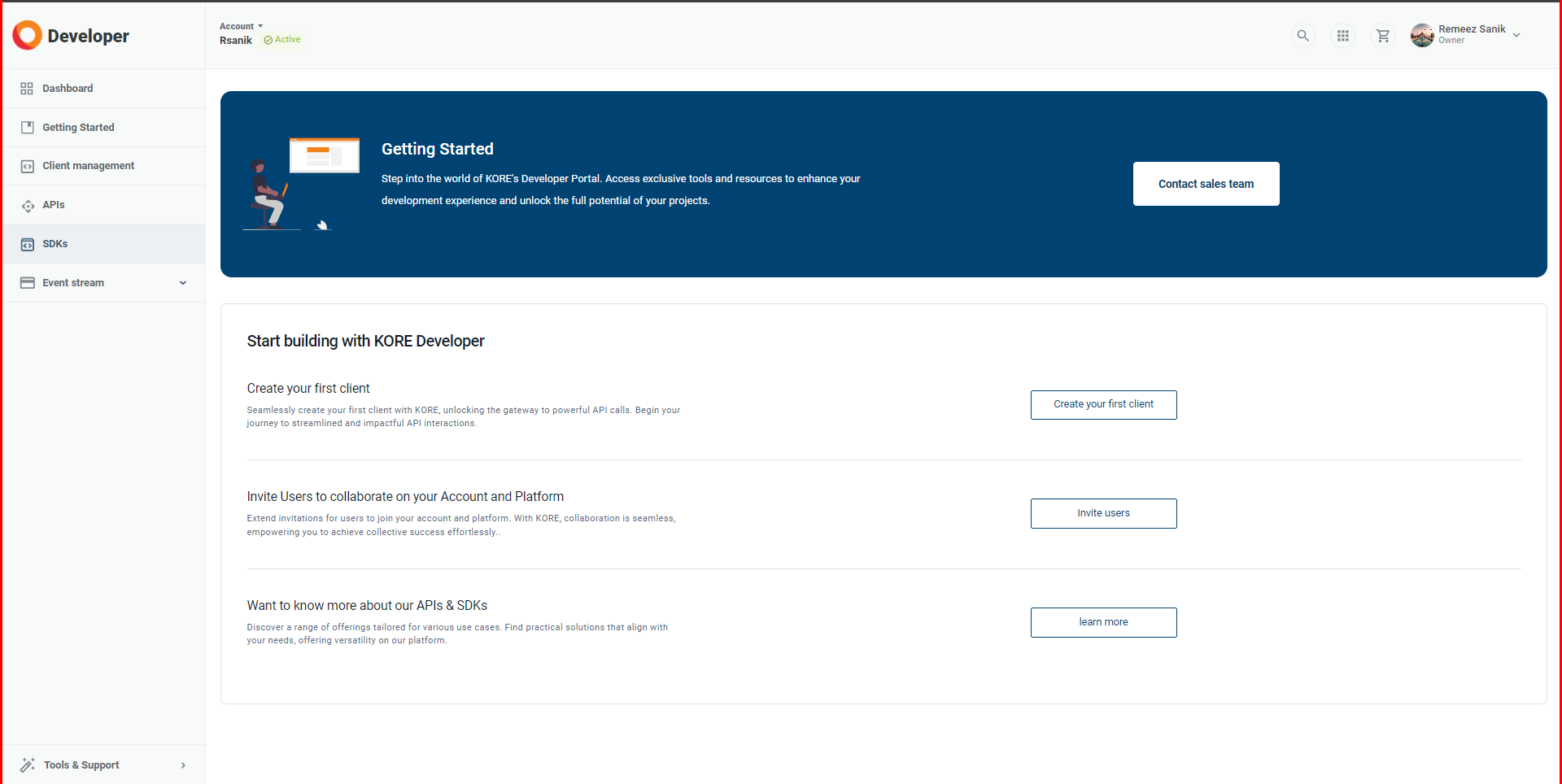
Navigate to KORE's [Developer Console](https://build.korewireless.com) and login if you have not already done so.
Getting Started
## Create your first API Client
{% hint style="info" %}
If you want more information on an API client, read through our [guide](/kore/developers/api-management/api-clients.md).
{% endhint %}
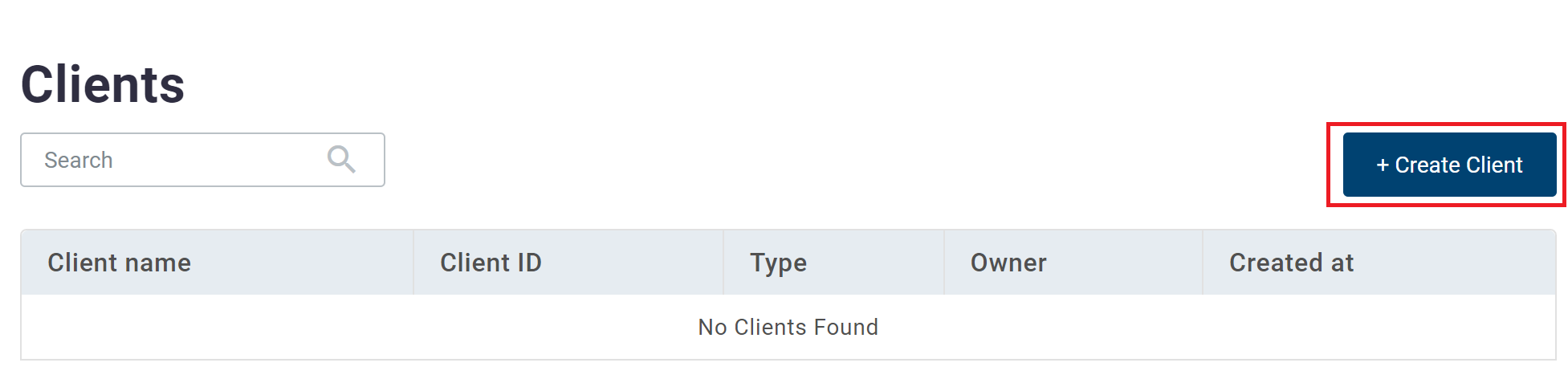
Navigate to the [client management](https://build.korewireless.com/clients/list) section of the developer console.
This table will be empty if you have not created any clients yet. Otherwise, you'll see your previous clients.
Go ahead and create your first client.
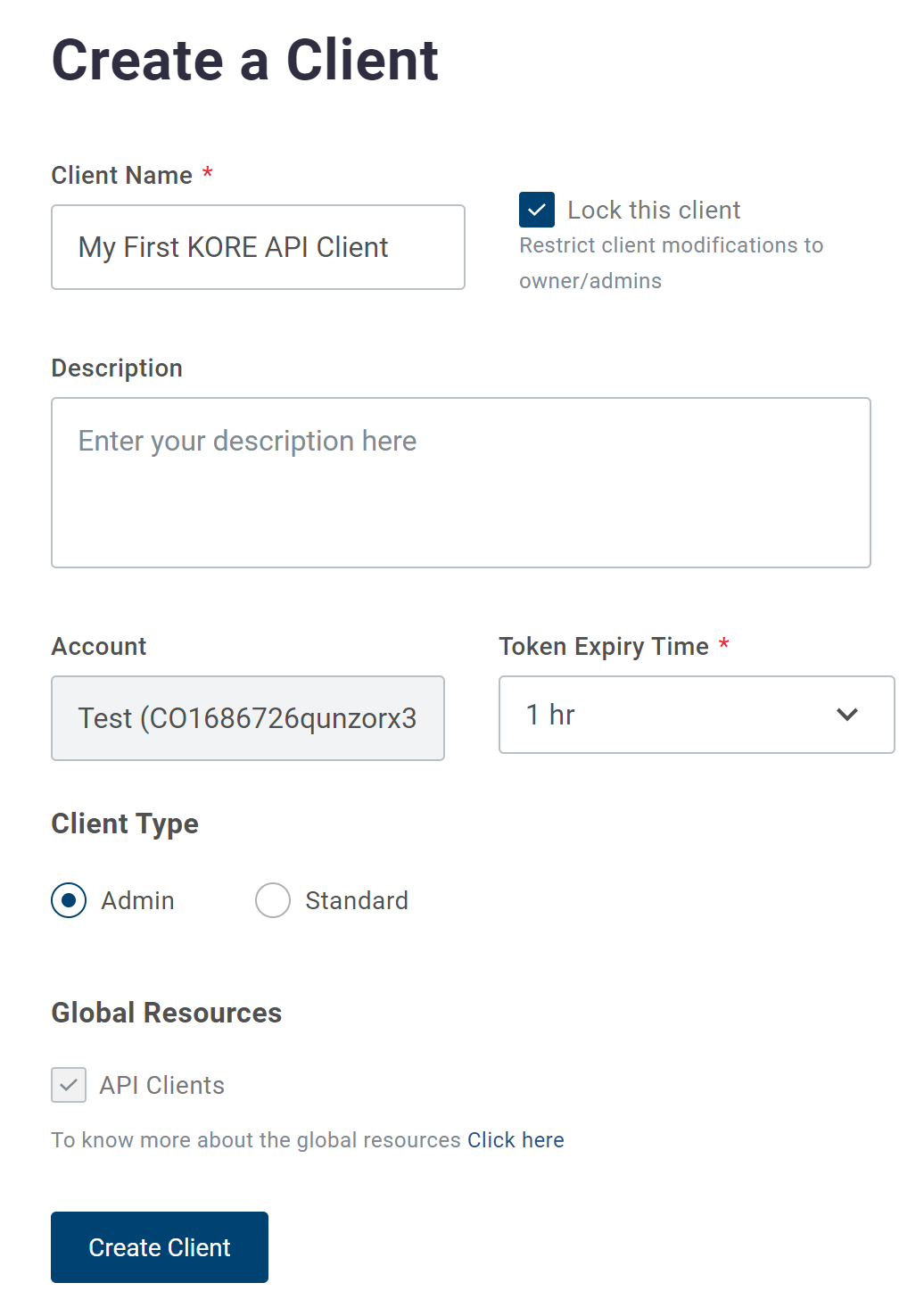
You will be given a screen that you will be required to fill out. Read our guide on [API clients](/kore/developers/api-management/api-clients.md) for details on what each field means. For this guide, we will keep things simple to get you on your way with KORE APIs.
**Client Name**
For the client name, type in anything you want or start with `My First KORE API Client.`
**Client Lock**
You can leave this enabled for now. You can disable it at a later time
**Description**
You can leave this blank for now
**Account**
This will be pre-populated with the account you are currently logged into.
**Token Expiry Time**
Leave the default value.
**Client Type**
You can select any client type. In this guide, we will assume you are an account owner or account admin, so go ahead and select the type `Admin`.
**Global Resource**
We will make a simple PING call for your first API call. Go ahead and click the `API Clients` global resource if it isn't already selected.
**Create Client**
Once you are happy with your first setup, click `Create Client`.
## Client Credentials
Once you click `Create Client`, you will be presented with your `Client ID` and `Client Secret`.
{% hint style="danger" %}
You cannot see your `Client Secret` once you navigate away from this page. Store the secret in a safe place and continue.
{% endhint %}
## First API Call
Your first API call will be calling our [PING endpoint](/kore/api/global-resources/api-clients/ping.md). This ensures you have successfully:
{% hint style="info" %}
Read our [guide on Authorization](/kore/developers/api-management/auth.md) for more details on how our APIs are authorized.
{% endhint %}
### Get an Access Token
Our first step will be to get an access token that ensures we have the right credentials and grants our application access to the APIs.
Use the Client Credentials, Client ID and Secret, you obtained in the [previous step](#client-credentials).
Using the example below, replace `${KORE_CLIENT_ID}` and `${KORE_CLIENT_SECRET}` with your credentials.
{% code title="Request" lineNumbers="true" %}
```bash
curl -X POST https://api.korewireless.com/api-services/v1/auth/token \
--header 'cache-control: no-cache' \
--header 'content-type: application/x-www-form-urlencoded' \
--data 'grant_type=client_credentials' \
--data "client_id=${KORE_CLIENT_ID}" \
--data "client_secret=${KORE_CLIENT_SECRET}"
```
{% endcode %}
If successful, KORE will respond with your access token (line 2 in the example below).
{% code lineNumbers="true" %}
```json
{
"access_token": "ACCESS_TOKEN",
"expires_in": "EXPIRY_TIME",
"token_type": "Bearer",
"scope": "YOUR_SCOPE"
}
```
{% endcode %}
### Make a PING call
With the access token, you can now start making API calls.
We will use the [PING endpoint](/kore/api/global-resources/api-clients/ping.md) in this example.
Replace `ACCESS_TOKEN` the example below shows the access token you received in the [previous step](#get-an-access-token).
{% code title="PING Request" lineNumbers="true" %}
```bash
curl 'https://client.api.korewireless.com/v1/ping' \
--header 'Authorization: Bearer ACCESS_TOKEN'
```
{% endcode %}
If successful, you will see a response as follows.
{% code title="Success Response" lineNumbers="true" %}
```json
{
"message": "Success"
}
```
{% endcode %}
{% hint style="warning" %}
Your `ACCESS_TOKEN` will expire based on your [API Client settings](/kore/developers/api-management/api-clients.md#token-expiry-time). Read our [guide on refreshing your access token](/kore/developers/how-to/apis/refresh-api-access-token.md) to learn how to prevent errors.
{% endhint %}
## Next Steps
:tada: **Congratulations**! You have successfully made an API call against KORE's APIs.
You can explore [KORE's various other APIs](https://docs.korewireless.com/kore/api/) to get started with one of our products.
---
# Agent Instructions
This documentation is published with GitBook. GitBook is the documentation platform designed so that both humans and AI agents can read, navigate, and reason over technical content effectively. Learn more at gitbook.com.
## Querying This Documentation
If you need additional information that is not directly available in this page, you can query the documentation by asking a question.
Perform an HTTP GET request on the following URL with the `ask` and `goal` query parameters:
```
GET https://docs.korewireless.com/kore/developers/get-started/apis.md?ask=&goal=
```
`ask` is the immediate question: it should be specific, self-contained, and written in natural language.
`goal` is what the user is ultimately trying to achieve, the reason they need the answer. Sharing it helps GitBook give you a better, more relevant answer. A goal is most helpful when it describes the outcome the user wants rather than restating the question. For example, with `ask=how do I create an API token`, a goal like `automate deployments from our CI pipeline` lets GitBook tailor the answer to that use case.
The response will contain a direct answer to the question and relevant excerpts and sources from the documentation.
Use this mechanism when the answer is not explicitly present in the current page, you need clarification or additional context, or you want to retrieve related documentation sections.